
How to Create and Approve a Purchase Requisition in SAP MM
Updated 10/12/20263 min read
1. Purpose
A Purchase Requisition (PR) is an internal request to procure materials or services required by a department. In the procure-to-quote process, the requester creates the PR, submits it for approval, and, after approval, makes it available to the purchasing team for sourcing.
The PR can be created directly in SAP S/4HANA or through the vendor/procurement portal, according to the implemented process.
2. Business scenario
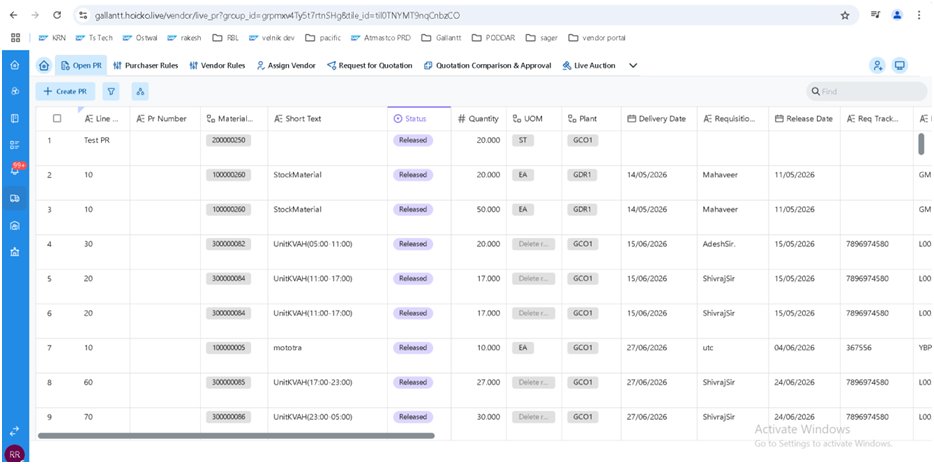
When a department needs materials or services, the requester creates a PR containing the required details, such as material or service, quantity, plant, delivery date, and account assignment. The PR passes through the configured approval process. Once approved, the PR item appears in the portal under Open PR, allowing the purchasing team to begin vendor sourcing.
3. Steps and SAP transaction codes
Create the purchase requisition. In SAP, use transaction . If the PR is created in the portal, the portal submits it to SAP through the agreed interface. The source document notes that the standard PR API/BAPI approach must be confirmed by the technical team.
Select the PR document type. Choose the appropriate PR type. This type is important because the PO type selected later in the process must match the originating PR type.
Submit the PR for approval. The PR is released through the configured release strategy or workflow.
Verify PR visibility. Once approved, the PR item should appear in the portal's Open PR list. The source describes this as a released requisition that has not yet been converted to a PO.
4. Configuration touchpoints
Configuration area | Details from the process document |
|---|---|
PR document types and number ranges | SPRO → MM → Purchasing → Purchase Requisition → Define Document Types ( |
Release strategy | Release groups, codes, indicators, and strategies with classification; characteristics may include plant, value, and purchasing group ( |
Portal status filter | The Open PR list should display released PR items with no PO and no open RFQ |
5. Integration points
Module / component | Integration touchpoint |
|---|---|
FI / CO | Account assignment such as cost center, WBS, or asset; budget or commitment checks where activated |
PP | PRs generated by MRP or planned/production orders enter the same Open PR list |
Workflow | Approver determination through release strategy or workflow agent rules |
6. Expected outcome
The PR is approved and visible under Open PR in the portal, ready for assignment to a responsible purchaser.
Process note: Goods receipt, invoice verification, and payment are outside the scope of this article and are covered by the separate procure-to-pay process.
FAQ
Q. Which SAP transaction creates a purchase requisition?
A. ME51N is the transaction cited in the source process for creating a PR in SAP.
Q. Can a PR be created in the portal?
A. Yes. The source process allows portal creation, with the portal posting the PR to SAP through the agreed interface.
Q. When does a PR appear in Open PR?
A. After it has been approved and meets the portal’s Open PR filter conditions.
Q. What details should I prepare before creating a PR?
A. Material or service, quantity, plant, delivery date and relevant account assignment.
Q. Does the PR document type matter later?
A. Yes. The source process specifies that the PO type should match the originating PR type; confirm this rule in the configured system.
Related content
Is this article helpful?
Help us improve our articles.