
How to Assign Purchase Requisitions to Purchasers
Updated 10/12/20262 min read
Overview
Purchaser assignment gives each eligible PR line item a clear owner. The Purchasing Head reviews the Open PR list and assigns work based on category, plant, workload or internal purchasing responsibility.
Steps
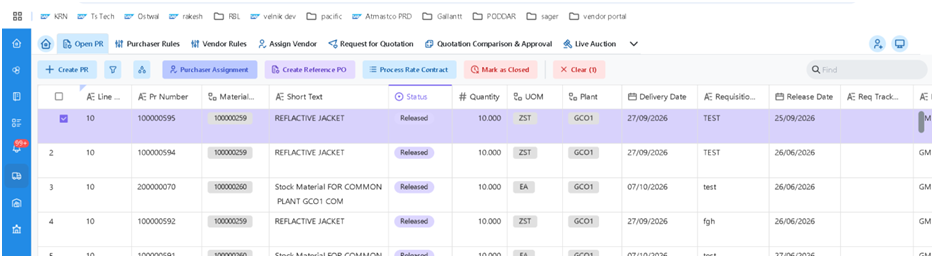
1. Sign in to the portal with the Purchasing Head role and open Open PR.
2. Review the PRs and select the required line item or line items.
3. Choose Purchaser Assignment.
4. Select the responsible purchaser from the available user list.
5. Save the assignment.
6. Confirm that the item appears in the assigned purchaser’s worklist and is no longer unassigned.
SAP edition considerations
|
Topic |
On-Premise / Private Cloud |
Public Cloud |
|
Standard assignment |
The source references the Fiori app “Assign and Process Purchase Requisition Items” for assignment by purchasing group / buyer. |
The same app is noted in the source; verify the app ID and available features in the Fiori Apps Library for the target release. |
|
Portal assignment |
A custom or portal function may write the responsible user to the PR item. |
Use released APIs / key-user extensibility; the source advises against custom ABAP in the core. |
|
Reference PO |
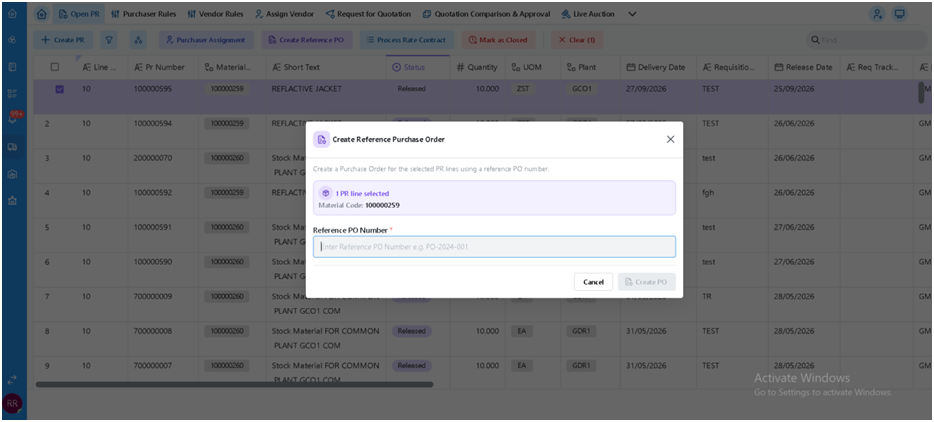
The source mentions “Create Reference Purchase Order” as a separate option to create a PO by reference to an existing purchasing document. |
Confirm availability and fit for the organization’s process. |
Controls and troubleshooting
· Check that the selected user is an authorized purchaser and is active in the system.
· If an item remains unassigned, refresh the worklist and verify that the save completed successfully.
· If the purchaser field is not available, confirm the portal role and the relevant SAP app/API capabilities.
FAQs
Q. Who assigns the purchaser?
A. The Purchasing Head assigns each eligible PR line item to a responsible purchaser.
Q. Can multiple PR line items be assigned at once?
A. The source process allows the Purchasing Head to select line item(s); the portal’s actual bulk-assignment capability should be confirmed.
Q. Where does the assigned item appear?
A. It should appear in the assigned purchaser’s worklist.
Q. Is the portal assignment standard SAP functionality?
A. The source describes portal assignment as a custom or portal function; standard SAP options depend on the S/4HANA edition and configuration.
Q. What is Create Reference Purchase Order?
A. It is a separate option described in the source that creates a PO by referring to an existing purchasing document, rather than following the standard PR/RFQ/quotation flow.
Related content
Is this article helpful?
Help us improve our articles.