
How Hoicko Assigns Tickets to Consultants & Teams
Updated 9/1/20263 min read
Manually forwarding every incoming ticket to the correct person simply doesn't scale once a team is handling hundreds of SAP tickets a month — and Hoicko dashboards commonly show totals in that exact range (for example, "413 Total SAP Tickets"). At that volume, manual triage becomes a full-time job on its own. Automated routing solves this by using the specific values already captured on the ticket at submission time to determine ownership instantly, with zero manual forwarding required.
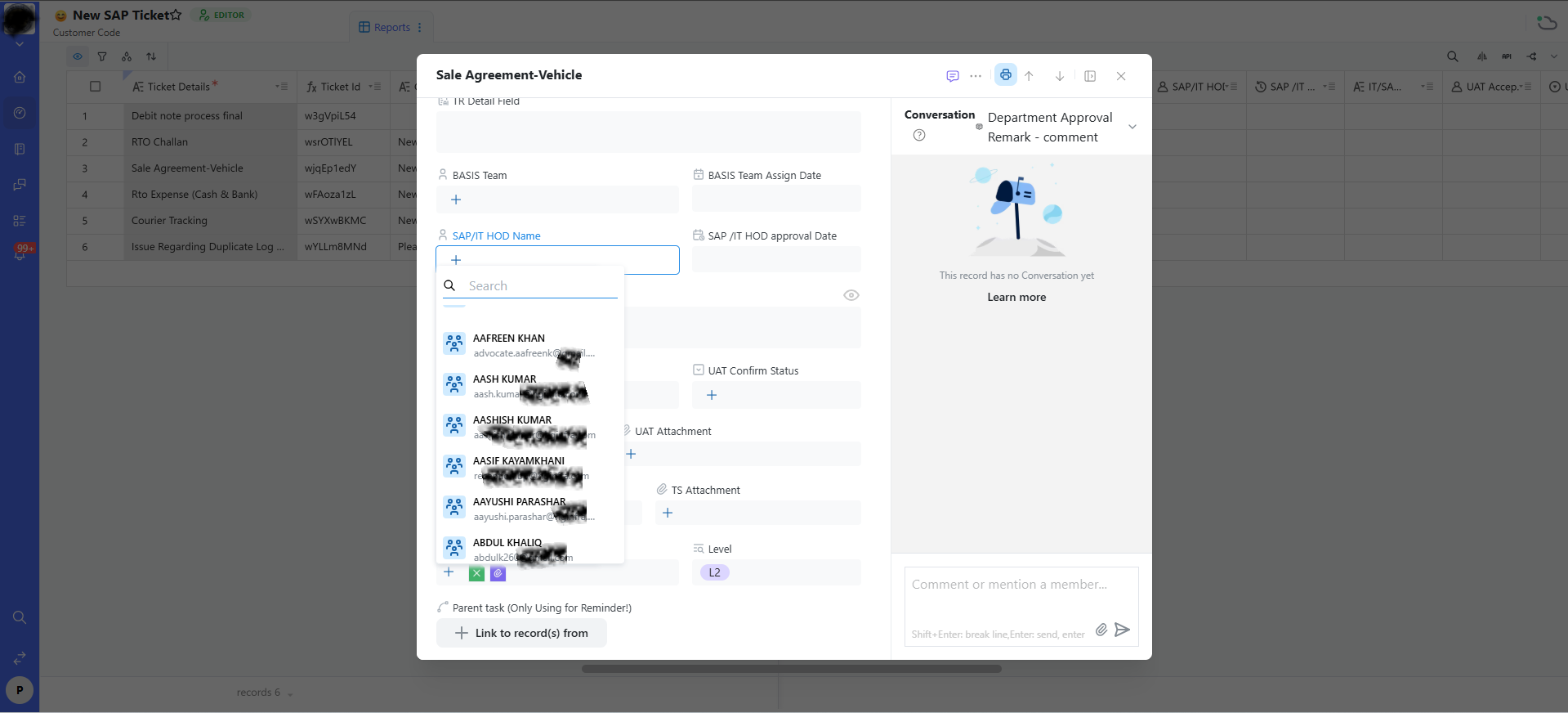
The fields that power routing
- SAP/IT HOD Name — the head of department responsible for sign-off on a given module or team. This field uses a searchable people-picker, so even in a large organization directory, finding the right HOD by name or email is fast.
- SAP/IT HOD Approval Date — a timestamp field, either auto-filled or manually stamped, once the HOD acts on the ticket, creating a clean audit trail of exactly when approval happened.
- BASIS Team and BASIS Team Assign Date — used specifically when the issue is infrastructure or technical-admin related, rather than a functional or ABAP-development problem. Routing a ticket here instead of to a functional consultant matters, because BASIS and functional consultants generally have entirely different skill sets and tooling access.
- UAT Confirm Status and UAT Attachment — populated once the ticket reaches the User Acceptance Testing stage, letting testers formally record and attach evidence of their sign-off.
- TS Attachment — for technical specification documents relevant to development work, kept attached to the ticket rather than living in a separate document repository.
- Level (e.g., "L2") — a support-tier or complexity indicator, which some routing configurations use to decide whether a ticket needs a specialist immediately or can start with first-line support.
How the routing logic actually works, in practice
When a ticket is submitted with a given Select Issue Type and Module, an automation rule (configured once by a workspace admin) matches those two values against a routing table and auto-fills fields like Consultant, SAP/IT HOD Name, or BASIS Team. This is why the accuracy of Issue Type and Module at submission time matters so much — those two fields are, in effect, the address label on the envelope, and everything downstream depends on getting that address right.
When manual override is appropriate
Automated routing handles the common cases correctly, but it isn't infallible — a genuinely unusual ticket might need manual reassignment even after auto-routing fires. The searchable people-picker fields (like SAP/IT HOD Name) exist precisely for this: automation gets you 90% of the way, and a quick manual correction handles the remaining edge cases without requiring anyone to change the underlying rules.
FAQs:
Q 1. Do I need to manually pick the HOD every time?
Not if routing is automated; manual picking is a fallback/override.
Q 2. Consultant vs. SAP/IT HOD Name — difference?
Consultant resolves the ticket; HOD approves/signs off.
Q 3. When does BASIS Team get involved?
For infrastructure, transport, or environment-related issues.
Q 4. Can routing rules be changed?
Yes, but usually only by a workspace admin.
Q 5. What does the "Level" field control?
Support tier, used by some automations to route to specialists.
Q 6. Why did routing pick the wrong consultant?
Check Issue Type and Module — they drive most routing logic.
Related content
Is this article helpful?
Help us improve our articles.