
Understanding Ticket Status Stages
Updated 9/1/20263 min read
A ticket's status is the shortest possible summary of "where does this stand right now" — and it's the single field every stakeholder relies on to avoid asking for a manual update. Because so much depends on it, it's worth understanding exactly what each stage means, not just what the label says.
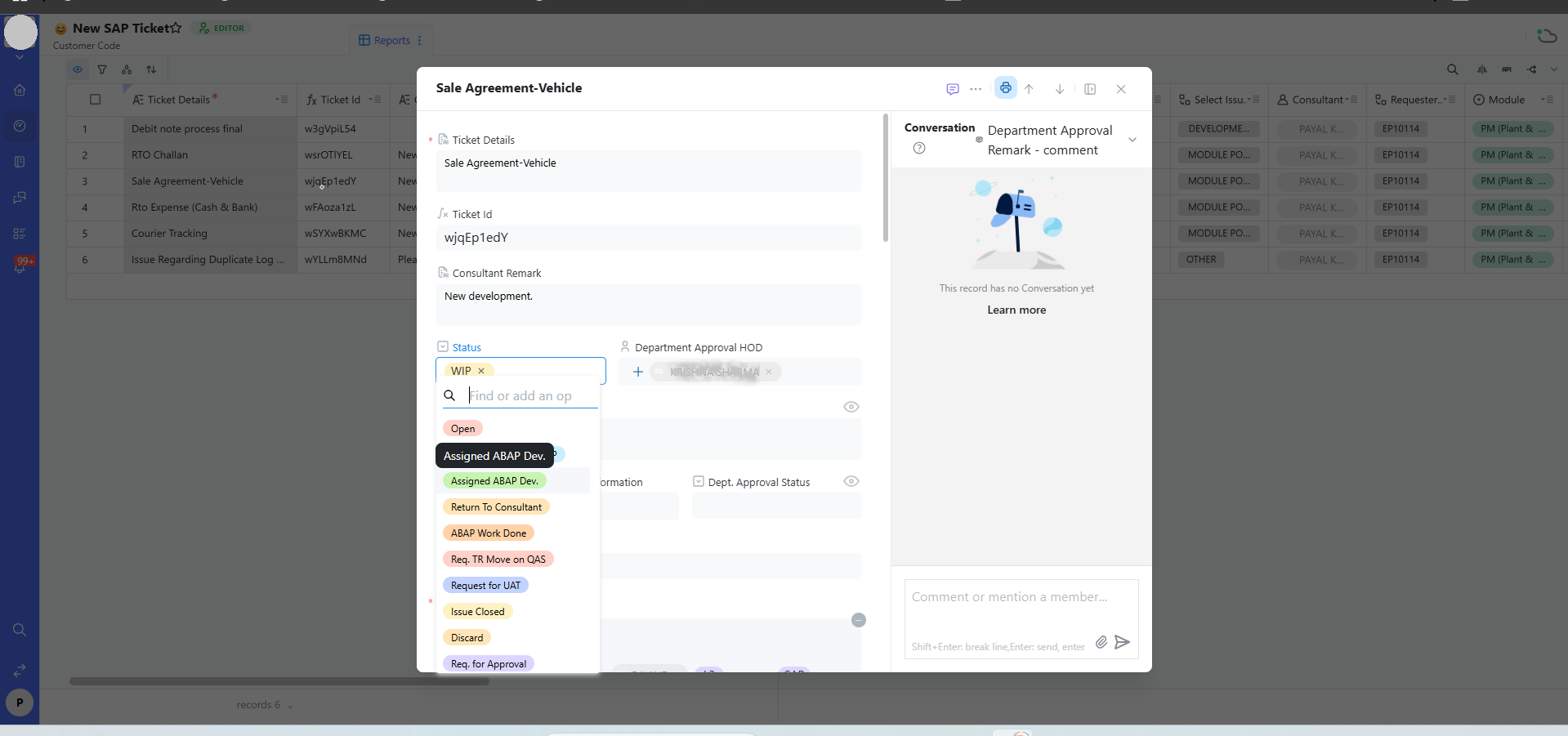
The full stage list, in typical progression order
- Open — the ticket has been submitted but not yet picked up by anyone. A healthy queue should have very few tickets sitting in Open for more than a day.
- Assigned ABAP Dev. — a developer has been explicitly assigned to do technical/coding work on this ticket. This is a more specific signal than generic "in progress," since it tells everyone the work has moved from the functional/consulting side into development.
- Return To Consultant — development work has been handed back for functional review before it's considered finished. This stage exists so nothing gets marked done purely because the code compiles — someone with functional context reviews it first.
- ABAP Work Done — development is complete and reviewed.
- Req. TR Move on QAS — a transport request has been formally raised to move the change into the QAS (quality assurance/testing) environment. This stage is a strong signal that the fix exists but hasn't been tested by end users yet.
- Request for UAT — the change is deployed to a test environment and ready for User Acceptance Testing by the actual business users who will rely on it.
- Issue Closed — the ticket is fully resolved, tested, and confirmed by the relevant stakeholders. This is the only status that should be treated as "truly done."
- Discard — the ticket was withdrawn, found to be a duplicate, or determined invalid. Discarding is a legitimate, healthy outcome, not a failure — it keeps reporting accurate by separating real work from noise.
- Req. for Approval — the ticket is paused, waiting on a formal sign-off from a Department Approval HOD or similar approver, before it can move forward. Covered in depth in the Automated Routing & Escalations category.
- WIP (Work In Progress) — a broader "actively being worked on" marker, used when a more specific stage doesn't quite apply, or as a general default while a ticket moves between more precise stages.
How to change a ticket's status correctly
Open the ticket record, click the Status field (shown as a colored tag), and select the new stage from the searchable dropdown. This single action can automatically trigger notifications to everyone listed under "Assign person/team for mail information" and immediately updates dashboard widgets like the "SAP Ticket Status" chart — so a status change isn't just cosmetic, it ripples through the entire reporting layer instantly.
Why status stages matter more than they might seem
Consider a manager glancing at the SAP Ticket Status chart on the Consultant's Dashboard. If your team consistently updates status accurately, that chart is a genuinely reliable snapshot of where the team's time is going — and it becomes a tool for spotting bottlenecks (say, a pile-up at "Req. TR Move on QAS" suggesting a transport backlog). If status updates are neglected, the same chart becomes misleading, and decisions based on it will be wrong.
FAQs:
WIP vs. "Assigned ABAP Dev." — what's the difference?
WIP is general in-progress; the other is a specific developer-handoff stage.
Q 1. What happens when I set a ticket to Discard?
It's marked invalid/withdrawn and drops out of active-ticket counts.
Q 2. Can status move backward?
Yes — for example, back to "Return To Consultant" if UAT finds issues.
Q 3. Who can change a ticket's status?
Usually the assigned Consultant, developer, or an approver with edit access.
Q 4. Does closing a ticket delete it?
No, it stays in Reports for historical reporting.
Q 5. When is "Req. for Approval" used?
Only for tickets that need formal sign-off before proceeding.
Related content
Is this article helpful?
Help us improve our articles.