
Understanding Course & Program Delays
Updated 8/18/20262 min read
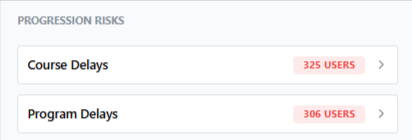
The Progression Risks widget on your dashboard is one of the most actionable tools in Taksha LMS—it proactively flags learners falling behind, rather than requiring you to go looking for problems.
What is a course delay?
A course delay is flagged when a learner has been assigned a course but hasn't completed it within the expected timeframe. This gives administrators an early signal to follow up before the learner falls further behind or forgets about the assignment entirely.
What is a program delay?
A program delay works similarly, but at the program level—flagging learners who are behind schedule on a multi-course learning path. Since programs often represent more critical, structured journeys like onboarding or certification, program delays are typically worth prioritizing over individual course delays.
How to investigate a delay:
- From the dashboard, click directly on the Course Delays or Program Delays number
- This opens a detailed, user-level breakdown showing exactly who is delayed and by how much
- From there, you can follow up directly—whether that's a reminder notification, a manual check-in, or reassigning a deadline
Common causes of delays:
- Learners weren't clearly informed about deadlines at the time of assignment
- Course content is too long or dense for the time learners have available
- Technical issues (e.g., broken video links) are silently preventing learners from progressing
- Competing priorities mean training gets deprioritized without a strong reminder system
Reducing delays proactively:
- Set realistic, clearly communicated deadlines when assigning courses
- Break long courses into smaller chapters so progress feels more achievable
- Review the Progression Risks widget on a regular cadence rather than only when someone asks about a report
Left unchecked, a small number of delays can compound into a much larger completion problem — which is exactly why this widget sits front and center on the dashboard rather than buried in a report.
FAQs:
What triggers a course delay?
A learner not completing an assigned course within the expected timeframe.
How do I investigate a delay?
Click the Course Delays or Program Delays number on the dashboard for a detailed breakdown.
Related content
Is this article helpful?
Help us improve our articles.