
Tracking Learner Progress
Updated 8/18/20261 min read
Assigning training is only half the job—knowing whether it's actually being completed is what makes a learning program effective. Taksha LMS gives you multiple layers of visibility into learner progress.
Course-level tracking: Within the Courses tile, you can view completion percentages for every learner enrolled in a specific course. This is useful when you need a focused view—for example, checking how a single onboarding course is performing.
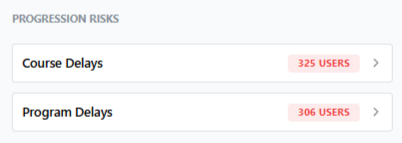
Program-level tracking: The Programs tile shows aggregate progress across every course within a program, giving you a bigger-picture view of how learners are moving through a full multi-course journey rather than just one piece of it.

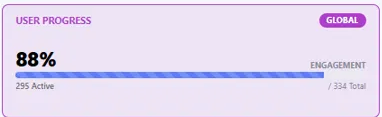
Dashboard-level tracking: For an organization-wide view, the User Progress widget on your main dashboard shows a global engagement percentage — how much of your active learner base is genuinely progressing through assigned content, not just enrolled in it.
Individual learner tracking: When you need detail on a specific person, the User Report feature (covered in more detail in Category 4) gives a full history of everything that learner has been assigned, completed, or is currently working through.
How often should you check progress? For active training rollouts—like a company-wide compliance push—checking progress weekly is reasonable. For steady-state, ongoing programs, a monthly review of the dashboard's Progression Risks and User Progress widgets is usually sufficient to catch issues early without becoming a full-time monitoring task.
Using progress data effectively: Progress tracking isn't just about identifying who's behind—it's also useful for spotting patterns. If a specific course consistently shows low completion across many learners, that's often a signal the content itself needs to be revisited, not just the individuals assigned to it.
FAQs:
Where can I track course-level progress?
In the Courses tile, showing completion percentage per learner.
How often should I check progress?
Weekly during active rollouts, monthly for steady-state programs.
Related content
Is this article helpful?
Help us improve our articles.