
Tracking SAP Ticket SLA, Ageing & TAT
Updated 9/1/20263 min read
Meeting deadlines consistently — not occasionally, but as a default — is what separates a well-run support desk from a chaotic one. Hoicko makes this measurable through two closely related fields present on every workflow and ticket record: SLA and Ageing Total. Understanding exactly how these two fields relate to each other is the foundation of every deadline-management habit covered later in this section.
The SLA field holds the target completion date agreed for that specific ticket (for example, 30/06/2026). It's essentially a promise — the date by which this issue is expected to be resolved. The Ageing Total field, in contrast, is a calculated formula field that automatically counts the number of days a ticket has been open, updating in real time with no manual input required. Put simply: SLA tells you where the finish line is; Ageing Total tells you how far you've already run.
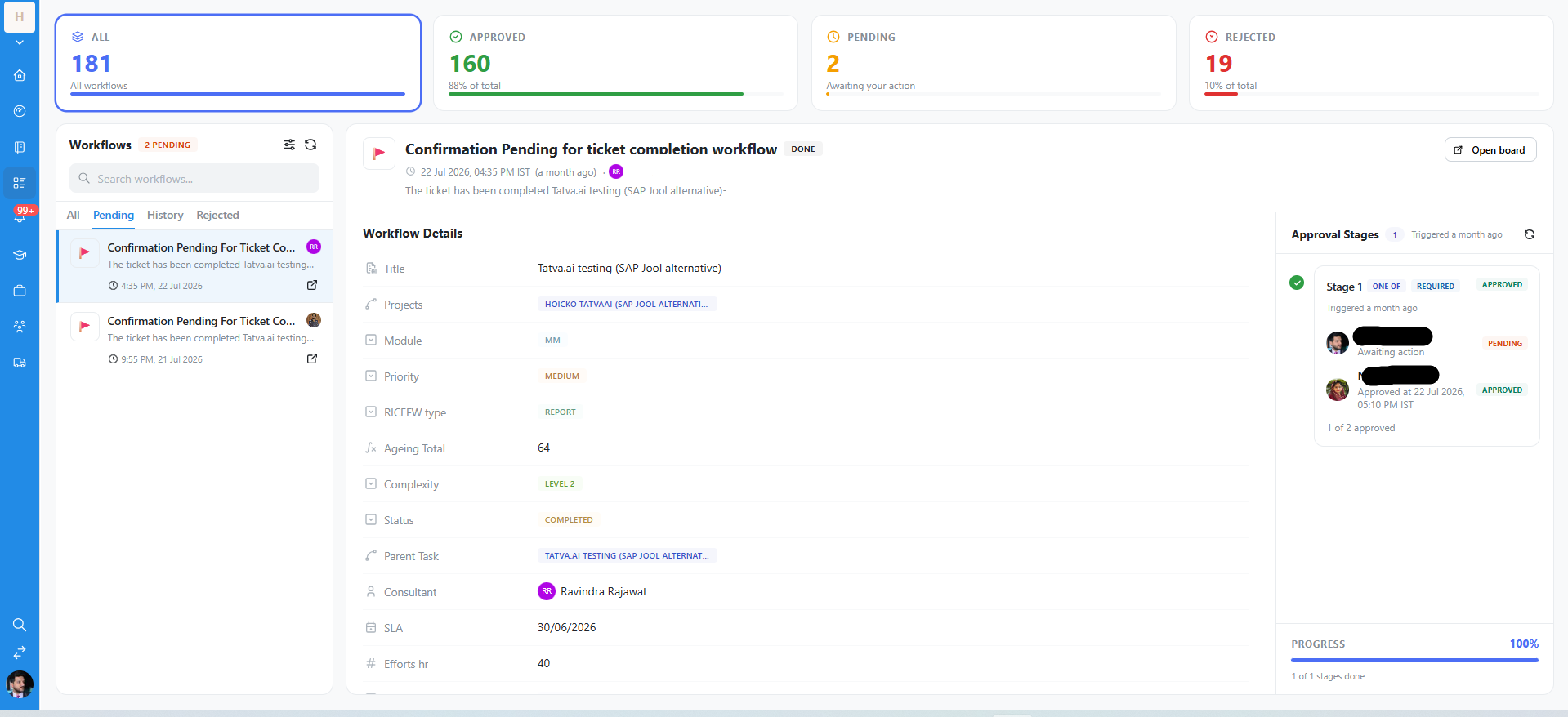
Supporting fields that add context to SLA tracking
- Priority (e.g., Medium/High/Low) — when several tickets are ageing at once, Priority is what tells you which one to work first. A well-disciplined team treats Priority as a genuinely limited resource, not a default "High" for everything.
- Complexity / Level (e.g., "Level 2") — a rough indicator of expected effort, which should directly inform how realistic a given SLA date is when it's first set.
- Efforts hr — an estimate of the actual hours of work required. This is the field capacity planning is built on: if your team's total open Efforts hr exceeds available capacity for the week, SLA breaches become statistically likely regardless of individual effort.
- Status — cross-referencing Status against the SLA date is how you spot risk early. A ticket still at "Open" with an SLA date three days away is a very different risk profile than one at "Request for UAT" with the same date.
Turning these fields into an early-warning system
The most effective habit here is simple: build a view sorted by Ageing Total, descending, so the oldest open tickets always surface at the very top of your screen — not buried somewhere in the middle of a long, unsorted list. Combined with a Priority filter, this single view answers "what should I work on next?" in seconds, every single morning, without requiring anyone to manually chase status updates.
Why Ageing Total is more reliable than "gut feel"
Because it's a formula field rather than something someone types in, Ageing Total can never be forgotten, forgotten to update, or quietly fudged. It's one of the very few numbers on the board that's guaranteed to be accurate at all times, which makes it a genuinely trustworthy input for both individual prioritization and team-level reporting.
FAQs:
Q 1. Is Ageing Total manual?
No, it's an auto-calculated formula field.
Q 2. What happens if Ageing exceeds SLA?
Hoicko doesn't auto-act; most teams set up an alert or filter to flag it.
Q 3. Can SLA targets differ by priority?
Yes, SLA is a date field you can set based on Priority.
Q 4. Does Ageing Total stop at closure?
Yes, it locks in the ticket's total open duration once closed.
Q 5. Where can I see average ageing across the team?
Build a widget on the Consultant's Dashboard aggregating Ageing Total.
Q 6. Efforts hr vs. Ageing Total — difference?
Efforts hr estimates work needed; Ageing Total is elapsed calendar time.
Related content
Is this article helpful?
Help us improve our articles.