
Tracking Build Sync Tickets Across Boards
Updated 9/2/20263 min read
Some workstreams generate enough ticket volume, or have different enough process needs, to justify their own dedicated board rather than living inside the general SAP ticket pool. A system migration, an environment sync effort, or a specific rollout project are all common examples — and Build Sync Tickets is exactly that kind of purpose-built board.
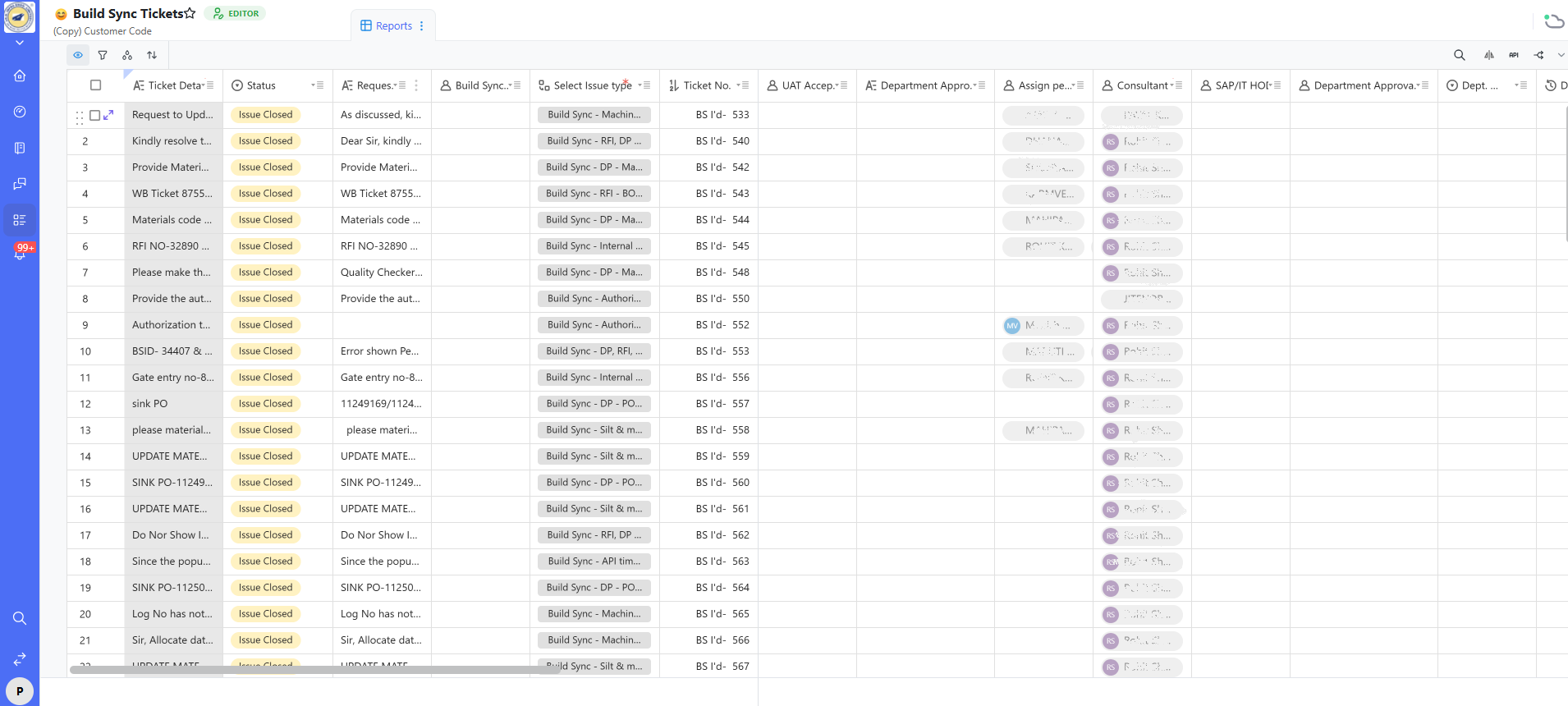
How this board mirrors — and differs from — the main ticket board
The core structure is intentionally the same as the New SAP Ticket board you already know, which keeps cross-board reporting consistent. A few columns are Build Sync–specific:
- Status — on this board, you'll typically see a high proportion of Issue Closed rows. That's expected, not concerning: Build Sync tickets are often short-lived, well-defined tasks (for example, "provide material code," "resolve RFI/DP mismatch") compared to the longer-running functional development tickets that dominate the main board.
- Requester — full text of the original request, kept intact for audit purposes.
- Build Sync... (category tag) — a categorization specific to this workstream (for example, "Build Sync - Machin...", "Build Sync - RFI, DP...", "Build Sync - Authori...").
- Select Issue type — the same field used on the main ticket form, deliberately kept consistent so cross-board reporting continues to work correctly.
- Ticket No. — a board-specific reference number (for example, "BS I'd- 533"), distinct from the general Ticket ID, and often the number used when this board's tickets are referenced in external communication such as vendor emails.
- UAT Acceptance, Department Approval, Assign person, Consultant, SAP/IT HOD, Department Approval remark, Dept. fields — the same approval and assignment fields used elsewhere in Hoicko, ensuring this board plugs directly into the same automated routing and reporting logic covered in earlier categories, rather than operating as an isolated silo.
Why keep it as a separate board rather than mixing everything into one
Separate boards allow workstream-specific automations, views, and dashboard tabs (like a dedicated "Buid Sync..." tab on the Consultant's Dashboard) without cluttering general SAP ticket reporting for everyone else — while still rolling up into company-wide totals when an admin has connected the boards via shared dashboard widgets.
When to consider creating a new dedicated board yourself
The right threshold is genuine volume or process difference, not simply "this feels like its own project." If filters and groups on the main board can already answer the same questions this project needs answered, a separate board usually adds maintenance overhead without a corresponding benefit.
FAQs:
Q 1. Why is Status mostly "Issue Closed" here?
These tickets are short, well-scoped tasks that resolve quickly.
Q 2. Ticket No. vs. Ticket ID — difference?
Ticket No. is board-specific; Ticket ID is system-wide unique.
Q 3. Do these tickets appear in main dashboard totals?
Yes, if connected via shared dashboard widgets.
Q 4. Do the same automations apply here?
Generally yes, since fields match the main board's structure.
Q 5. Should every project get its own board?
Only when volume or process differences justify it.
Q 6. How do I get access to this board?
Contact your workspace admin or the board owner.
Related content
Is this article helpful?
Help us improve our articles.