
From Insight to Action
Updated 8/31/20262 min read
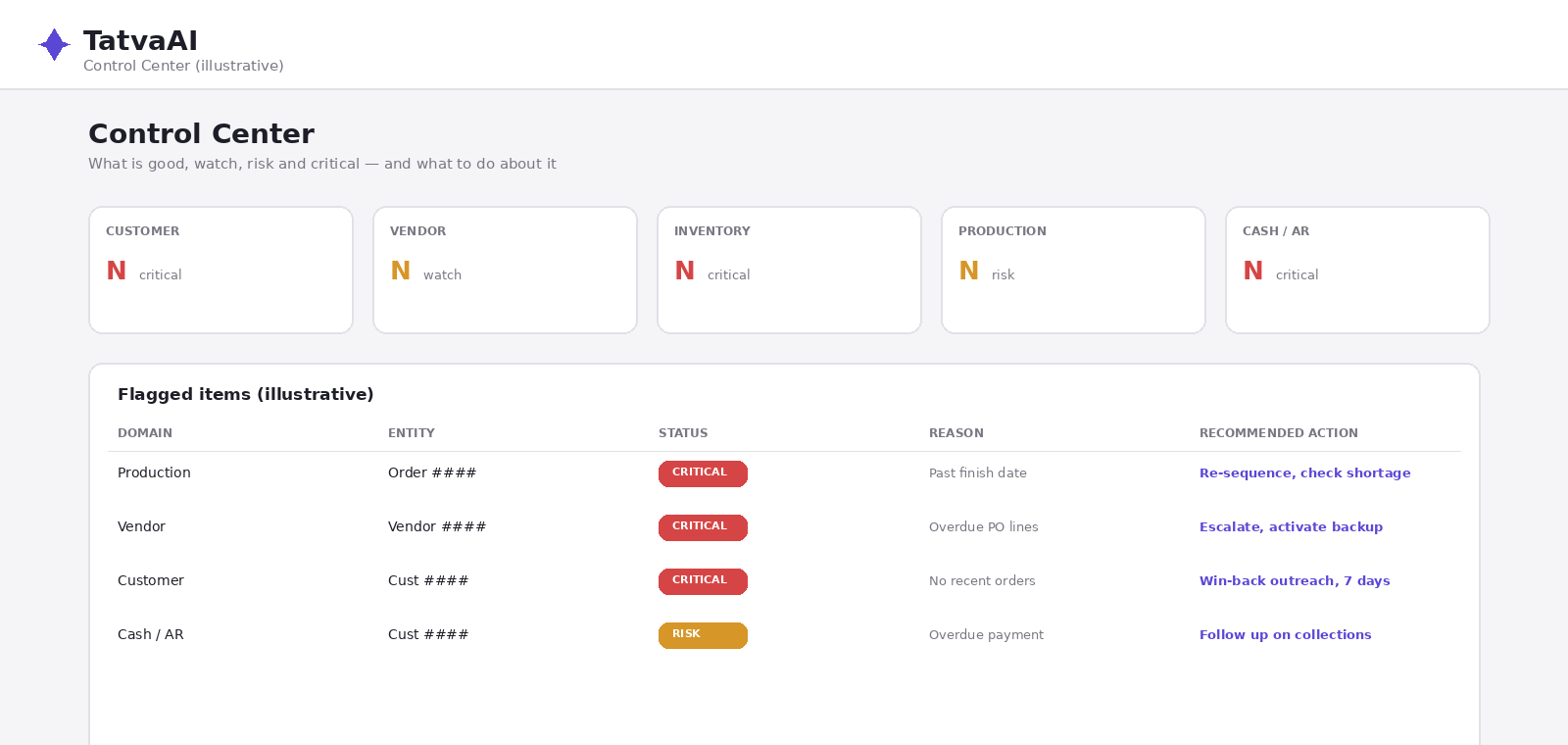
Spotting a problem is only half the job — knowing what to do about it is the other half. TatvaAI's Control Center pairs every flagged item with a specific recommended action, turning raw risk signals into a task list a team can act on right away.
Why Recommended Actions Matter
A dashboard that says "vendor X is critical" tells you there's a problem, but not what to do next. TatvaAI goes a step further by generating a recommendation tied to the type of issue — such as "re-sequence on line, check component shortage, expedite" for a production delay caused by a component issue.
Examples of Recommended Actions by Domain
- Production delay — "re-sequence on line, check component shortage, expedite"
- Overdue vendor — "escalate to vendor management, activate backup source, expedite"
- At-risk customer — "win-back outreach within 7 days, check open returns/complaints"
- Inventory shortage — recommendations typically point toward reordering or checking alternate sources
How This Changes Daily Workflow
Instead of a manager reviewing raw numbers and independently deciding what action to take, the recommendation is already drafted, so the manager's role shifts to reviewing, approving, and assigning the action — saving time on the analysis step.
Combining Recommendations With "Ask the Control Center"
Alongside the flagged items table, the Control Center includes an "Ask the Control Center" panel with example plain-language questions, such as "Who suddenly stopped ordering?" or "What's critical today?" This lets users dig deeper into any recommendation before acting on it.
Practical Use Case
A supply chain manager sees a production order flagged critical with the recommendation "re-sequence on line, check component shortage, expedite." Rather than investigating from scratch, they immediately check component availability, since the recommendation already narrowed down the likely cause.
FAQ
Q1: What is a recommended action?
A specific next step suggested for a flagged risk item.
Q2: How is this different from just seeing a number?
It tells you what to do, not just what's wrong.
Q3: What kind of action is suggested for overdue vendors?
Escalating to vendor management and activating a backup source.
Q4: What is suggested for at-risk customers?
A win-back outreach and checking for open returns or complaints.
Q5: Can I explore a recommendation further before acting?
Yes, using the "Ask the Control Center" panel for follow-up questions.
Related content
Is this article helpful?
Help us improve our articles.