
Bulk Enrollment of Learners
Updated 8/18/20261 min read
When you need to onboard dozens or even thousands of learners at once, assigning courses one at a time isn't practical. Taksha LMS's bulk enrollment feature is built exactly for this scenario.
How to bulk enroll learners:
- Go to AssignCourse
- Select the Bulk Assign option
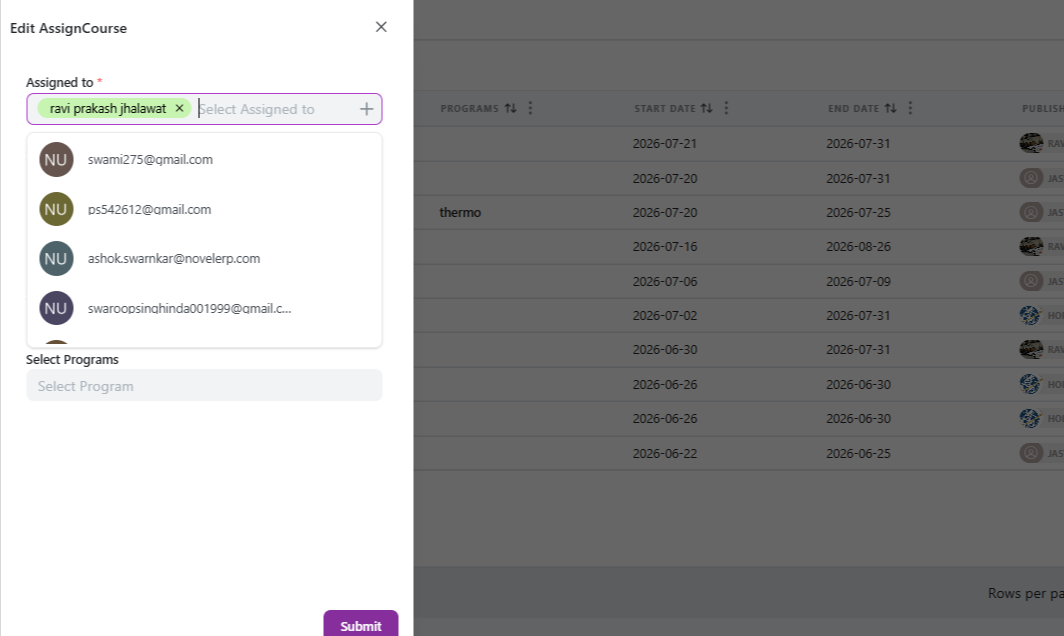
- Either upload a learner list (typically via a file with names/emails) or select an existing group or department already set up in the system
- Choose the course or program to assign
- Confirm the assignment
Preparing for a successful bulk enrollment:
- Make sure your learner groups or departments are set up and accurate before running a bulk assignment—messy group data leads to messy enrollment
- If uploading a list, double-check formatting matches what the platform expects to avoid failed or partial uploads
- Run a small test assignment first if you're bulk-enrolling a very large group for the first time, just to confirm everything flows correctly
After bulk enrollment—what to check:
- Confirm the new total appears correctly under Total Ecosystem Users and the relevant course's enrollment count
- Monitor the Progression Risks widget over the following days/weeks to catch early signs of course delays across the newly enrolled group
- Use the User Report feature to spot-check a handful of individual learners, confirming their enrollment and access are working as expected
Bulk enrollment turns what would otherwise be hours of manual work into a process that takes minutes—critical for organizations scaling training across large or fast-growing teams.
FAQs:
How do I bulk enroll learners?
Go to AssignCourse > Bulk Assign, upload a list or select a group, then confirm.
Should I test bulk enrollment first?
Yes, especially for very large groups, to confirm everything works correctly.
Related content
Is this article helpful?
Help us improve our articles.