
Turn a Profile Into a Template
Updated 9/8/20262 min read
A Hoicko signature profile becomes a reusable template the moment its Pdf Text trigger and Signature Type are set to match a standardized document layout — meaning any new PDF using the same wording and format can be signed by the same profile without reconfiguration.
Why Templating Matters at Scale
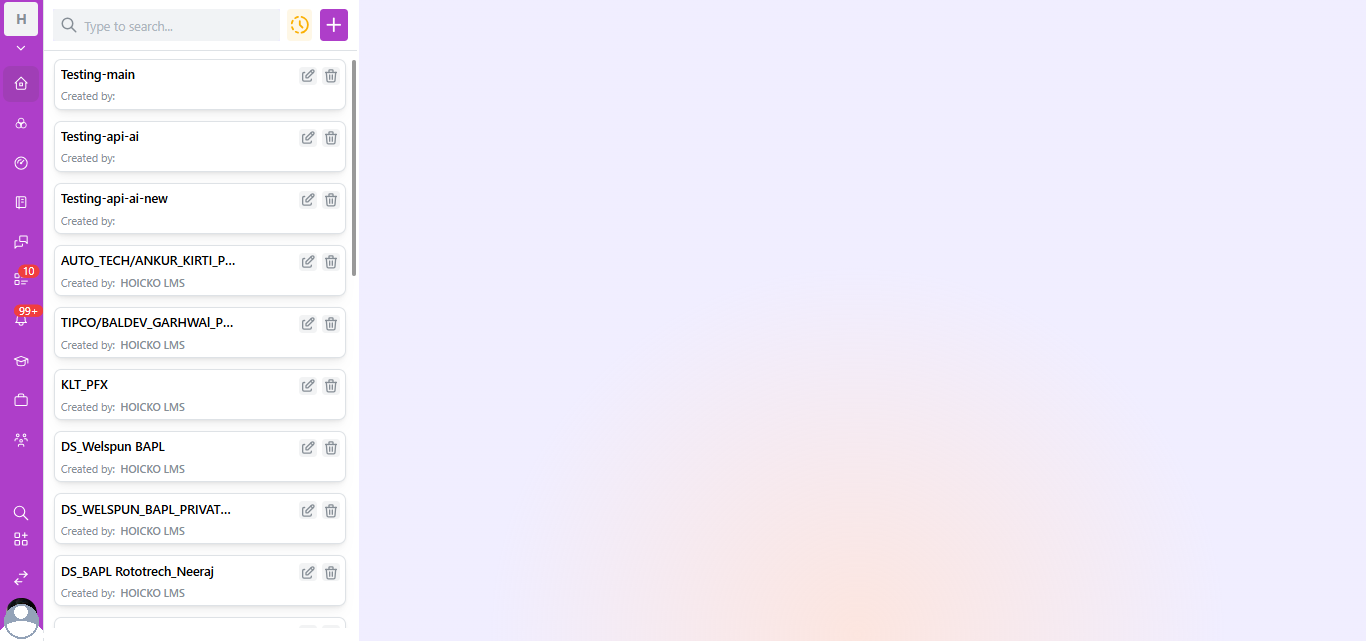
Looking at a real Hoicko workspace's Signatures list — profiles like AUTO_TECH/ANKUR_KIRTI_P..., TIPCO/BALDEV_GARHWAL_P..., KLT_PFX, DS_Welspun BAPL, and DS_BAPL Rototrech_Neeraj — a clear naming pattern emerges: [Client or Entity] + [Purpose/Owner]. This is templating in practice: each profile is pre-configured once, then reused indefinitely for that client or department's recurring documents.
Step-by-Step: Building a Template-Ready Profile
- Identify a recurring document type — e.g., dealer agreements, offer letters, vendor onboarding forms.
- Standardize the document source. Ensure every instance of this document type is generated from the same base template (Word/PDF generator, CRM merge doc, etc.) so wording near the signature line never changes.
- Create one signature profile per recurring use-case, not per individual document. Use the naming convention
[Entity/Client]_[Purpose]for fast searchability later (see naming examples above). - Set "Search by Text" as the Signature Type with a Pdf Text trigger that appears identically across every instance of that document (e.g., "Authorized," "Signed By," or a department-specific label).
- Test with 2–3 sample documents before rolling out at volume, checking the Success/Failed stats after each test.
- Document the template's purpose somewhere your team can reference (a shared wiki or the profile title itself) so future admins understand when to use it.
Naming Convention Best Practices
- Prefix with the client or business unit (as seen in "TIPCO/", "DS_Welspun BAPL")
- Suffix with the owner or purpose (e.g., "Rototrech_Neeraj")
- Avoid duplicate or near-duplicate names ("Testing-api-ai" vs. "Testing-api-ai-new") without a clear versioning reason—this creates confusion in high-volume lists
Frequently Asked Questions
Q 1. How many signature profiles/templates can a workspace have?
Hoicko workspaces commonly manage dozens of active profiles simultaneously, as shown in real deployments with client-specific and department-specific templates.
Q 2. Can I duplicate an existing profile instead of building one from scratch?
Use the edit icon to review an existing profile's configuration as a reference, then apply the same signature type and PDF text pattern to a new profile for the new use case.
Q 3. Should every department have its own template, or can one template serve multiple departments?
If the document wording near the signature line is genuinely identical across departments, one template can serve all of them—but most organizations use one template per distinct document type for cleaner audit trails.
Is this article helpful?
Help us improve our articles.