
How to Sign Up for Hoicko CRM
How to Sign Up for Hoicko CRM
Updated 8/12/20261 min read
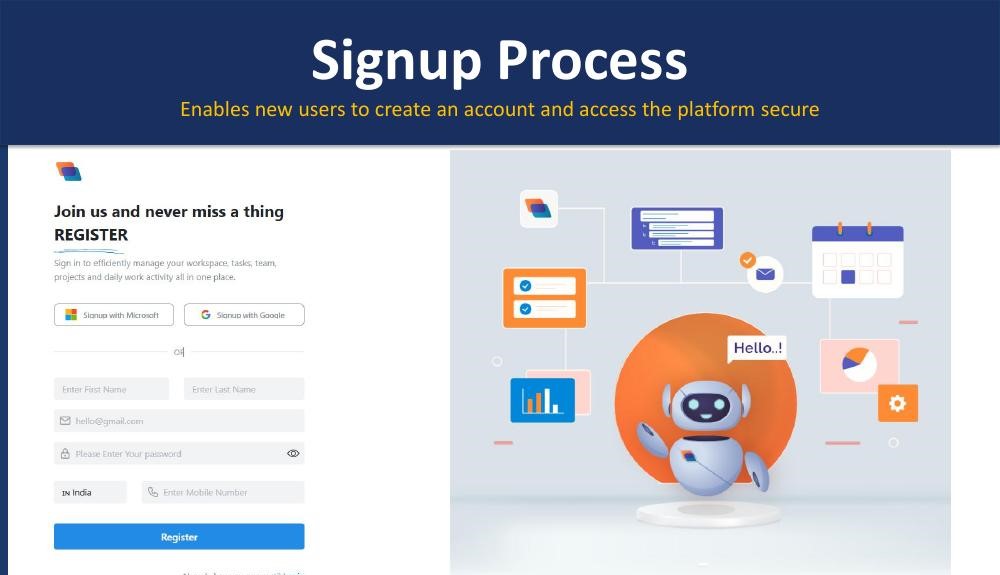
New users can sign up for Hoicko CRM in under a minute using Google or Microsoft single sign-on, or by registering manually with a name, email, mobile number, and password.
Steps:
- Go to the Hoicko CRM signup page.
- Choose Sign up with Google or Sign up with Microsoft for one-click registration — or continue manually.
- For manual signup, enter your First Name, Last Name, Email, Mobile Number, and Password.
- Click Register.
- If you already have an account, click Login instead of registering again.
Key highlights:
- Quick registration via Google or Microsoft accounts
- Manual sign-up with Name, Email, Mobile Number, and Password
- Secure authentication and validation on every signup
- Simple, single-screen registration form
- Direct link to the login page for returning users
FAQ
- Can I sign up with just my email?
Yes — manual signup only requires name, email, mobile number, and a password; no company approval is needed to create the account itself.
- What if I already have an account?
Click Login on the signup screen instead of registering again.
Is this article helpful?
Help us improve our articles.