
Filtering the Audit Trail
Updated 9/8/20262 min read
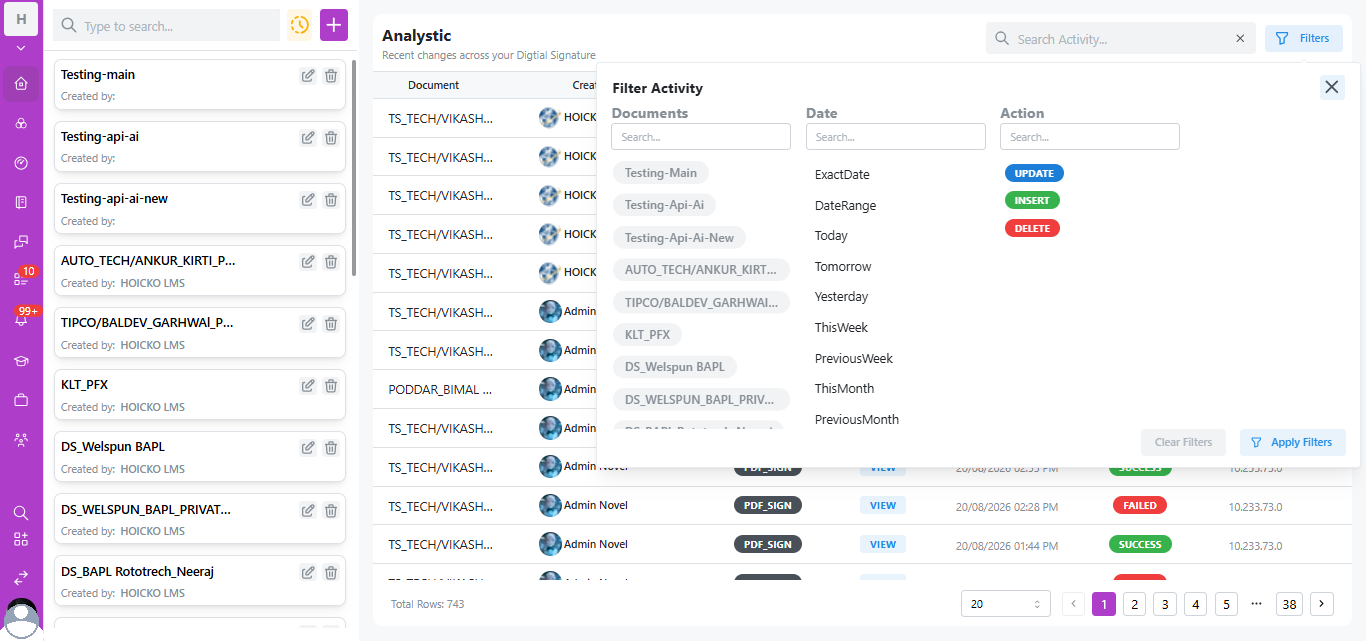
Click Filters on any Analytic table in Hoicko to open the Filter Activity panel, where you can narrow results by Documents (search or select from tags), Date (Exact Date, Date Range, Today, Yesterday, This Week, Previous Week, This Month, Previous Month), and Action (Update, Insert, Delete) — then click Apply Filters to instantly narrow potentially hundreds or thousands of audit rows down to exactly what you need.
Why Filtering Matters at Scale
A single Hoicko workspace's audit trail can span hundreds of rows (real deployments show totals like "743" rows across 38+ pages) spanning multiple document templates (e.g., "TS_TECH/VIKASH...", "PODDAR_BIMAL...") and multiple users. Manually scrolling through this data isn't practical—the Filter Activity panel is the primary compliance research tool.
Step-by-Step: Filtering the Audit Trail
- Open any signature profile's Analytic section, or the broader Audit Trail view.
- Click the Filters button (top-right of the Analytic panel).
- Under Documents, either type in the search box or click document-tag chips (e.g., "Testing-Main," "KLT_PFX," "DS_Welspun BAPL") to multi-select relevant templates.
- Under Date, choose a preset (Today, Yesterday, ThisWeek, PreviousWeek, ThisMonth, PreviousMonth) or select ExactDate/DateRange for a custom window.
- Under Action, select UPDATE, INSERT, and/or DELETE depending on what type of change you're investigating.
- Click Apply Filters to refresh the table, or Clear Filters to reset.
Common Filtering Scenarios
- "Show me every failed signature last week" → Date: PreviousWeek + review API Status column for FAILED rows.
- "Who touched this specific contract template?" → Documents: select the specific template tag + Action: all types.
- "Audit everything a specific user did this month" → Date: ThisMonth, then cross-reference the Created By column manually (or use the search bar for the user's name).
Frequently Asked Questions
Can I combine Document, Date, and Action filters at the same time?
Yes—all three filter groups (Documents, Date, Action) work together; applying multiple narrows results across all selected criteria simultaneously.
How many total records can the audit trail hold?
Real Hoicko deployments show audit trails spanning hundreds of rows across dozens of pages (e.g., 743 total rows across 38 pages), with pagination controls (20 rows per page, adjustable) and page-jump navigation.
Can I search by a partial document name?
Yes, the Search Activity... bar above the table and the Documents search box within Filters both support partial-text matching.
Is this article helpful?
Help us improve our articles.