
Creating Your First Course
Updated 8/18/20262 min read
Creating your first course is the milestone that turns Taksha LMS from an empty dashboard into a working training system. This guide walks you through the full process, from an empty course shell to something ready to assign to learners.
Step 1: Create the course shell.
Go to Management Layout > Courses and click Add Course. Enter a clear, descriptive title and a short description explaining what the course covers and who it's for. 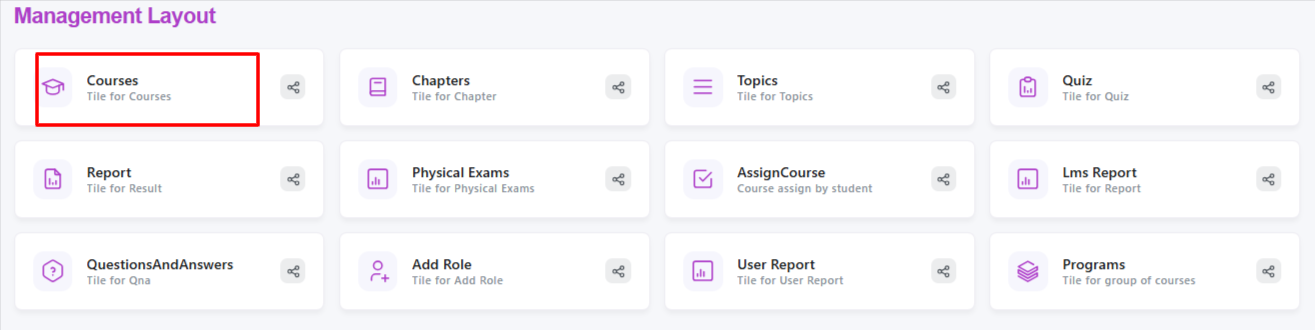
Step 2: Add chapters. Chapters break your course into logical sections. If you're building an onboarding course, for example, your chapters might be "Company Overview," "Tools & Systems," and "Policies & Compliance." Keep chapter titles short and outcome-focused.
Step 3: Add topics within each chapter. Topics are the individual lessons inside a chapter. Each topic should cover a single, clear idea—this keeps content digestible and easier for learners to track their progress through.
Step 4: Upload supporting content Within each topic, add the actual learning material—videos, PDFs, slides, or written instructions. Mixing formats (a short video plus a downloadable reference file, for example) often improves learner retention.
Step 5: Add a quiz (optional but recommended) If you want to measure understanding, attach a quiz to the course. This can be tied to a specific chapter or placed at the end of the full course as a final assessment.
Step 6: Review and publish Before publishing, review the course from a learner's perspective—check that videos play correctly, files download properly, and the quiz logic works as expected.
Step 7: Assign to learners Once published, go to AssignCourse to enroll your first set of learners, either individually or as a group.
Tips for a strong first course:
- Keep your first course simple—a smaller pilot course helps you learn the platform's mechanics before scaling to larger content
- Use consistent naming conventions across chapters and topics so your content library stays organized as it grows
- Test the full learner journey yourself before assigning it to your team
Once your first course is live and assigned, you'll start seeing real progress data flow into your dashboard—a good next step is reviewing your Admin Dashboard metrics to see how learners are engaging with it.
FAQs:
Do I need a quiz for every course?
No, it's optional but recommended if you want to measure learner understanding.
Can I edit a course after publishing it?
Yes, chapters, topics, and content can be updated anytime.
Related content
Is this article helpful?
Help us improve our articles.