
Creating and Managing Programs
Updated 8/18/20262 min read
When training requires more than one course — like a full onboarding journey or a multi-stage certification track — Programs let you bundle multiple courses into a single, structured learning path.
Creating a Program:
- Go to Management Layout > Programs
- Click Add Program and give it a clear, descriptive name
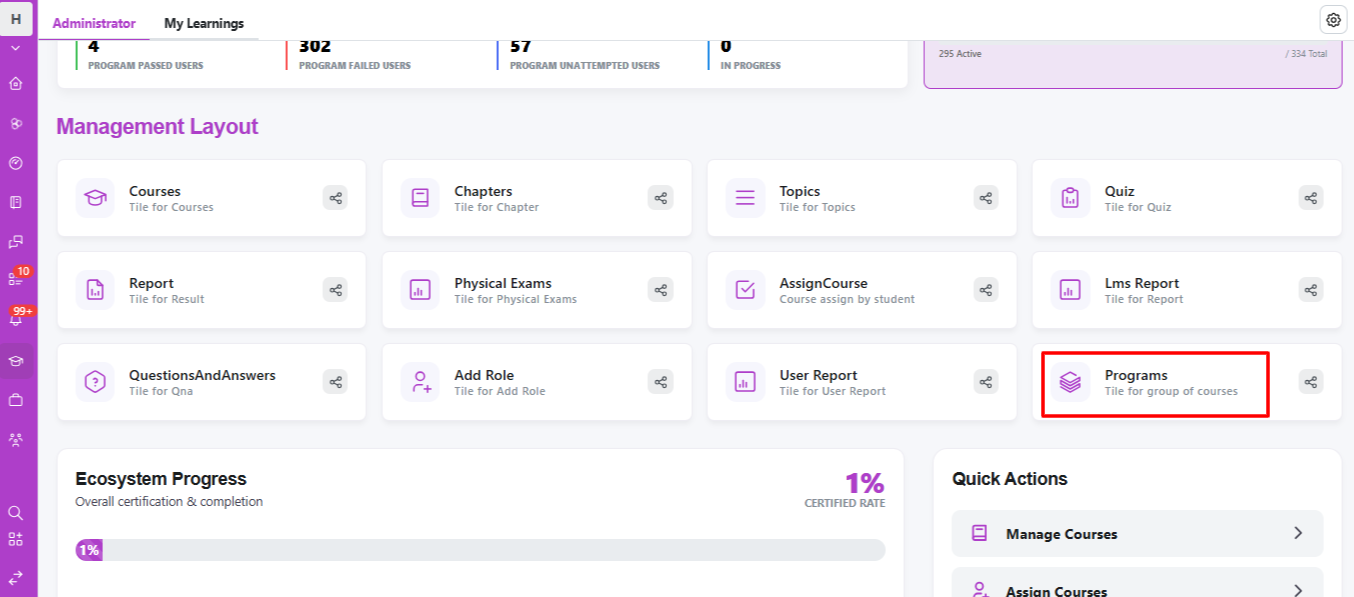
- Select the courses you want to include from your existing course library
- Set the sequence in which learners should complete them
- Save and assign the program to learners or groups
When to use a Program instead of individual courses:
- Onboarding journeys that span multiple topics (company overview, tools training, compliance) that should be completed in a specific order
- Certification tracks requiring learners to pass several related courses before earning a credential
- Role-based learning paths, where different departments need a specific sequence of courses relevant to their function
Managing an existing Program: Programs can be edited at any time — add new courses as your training needs evolve, reorder existing ones, or remove outdated content. Learners already enrolled will see updates reflected in their assigned path.
Tracking Program performance: Once a Program is live, its performance appears on your dashboard under Program Performance Distribution, showing how many learners have passed, failed, are unattempted, or currently in progress — giving you a clear, program-wide view rather than having to check each course individually.
Best practices for structuring Programs:
- Keep the sequence logical — foundational courses first, more advanced or specialized ones later
- Avoid overloading a single Program with too many courses at once; break large training needs into multiple, smaller Programs if necessary
- Regularly review program Delays on your dashboard to catch learners falling behind before it becomes a larger issue
Programs are one of the most powerful tools in Taksha LMS for organizations managing structured, multi-step training journeys at scale.
FAQs:
When should I create a program instead of a single course?
When training requires multiple courses completed in a specific sequence.
Can I edit a Program after learners are enrolled?
Yes, you can add, reorder, or remove courses anytime.
Related content
Is this article helpful?
Help us improve our articles.